
StudyRoute · Verified 9 November 2026
Bachelor’s, master’s and preparatory programmes. This guide explains how to choose an application route, complete My assist, obtain a VPD, use Hochschulstart where required and proceed from application to enrolment. Links take you to official instructions and portals where you carry out each action yourself.
Quick answer. Germany has no single application portal for every university. Start with the programme’s instructions for your applicant category. The university may use uni-assist, require a VPD followed by its own application, or accept applications directly. Hochschulstart sometimes forms an additional part of that route. An account, a paid evaluation or even a positive uni-assist result does not mean you are enrolled.
This is a country guide. Intake dates, exact document lists, programme fees and individual exceptions need separate checks. A personal StudyRoute brief turns them into a calendar for your chosen universities.
Start with your education pathway
After school: a bachelor’s degree
First check whether your qualification gives you access to German higher education: Hochschulzugangsberechtigung, HZB. Access can be general or restricted to particular subjects. Citizenship or years of schooling alone do not settle this: the issuing country, qualification, subjects and previous studies matter. The university makes the final decision. DAAD: admission requirements.
- Open Check: university admission.
- Choose the country that issued your educational qualification, which may differ from your citizenship or residence.
- Answer the questions about your qualification and previous studies in order. Do not choose a roughly similar diploma if yours is missing.
- Save the result and compare it with the university’s International applicants section.
- If the result is unclear, send the International Office your qualification’s name and educational history. Ask whether direct entry is possible and for which subjects.
The online result is guidance, not recognition or a promise of a place. Another official reference is anabin, an information database, not a university application portal.
After a first degree: a master’s degree
You will normally need a recognised first degree in a suitable subject. Universities assess how your previous studies match their programme. Rules for applying before graduation, grades, language and additional evidence vary. uni-assist: Master’s.
Open the master’s Admission requirements and Application pages. Record the required field, subjects and credits, minimum grade, language certificate, additional tests and whether a current transcript can replace a final diploma temporarily. Prepare module descriptions if requested. Identical degree titles do not prove that curricula match.
If you lack academic requirements, ask whether the university provides additional modules or another preparatory option. Do not assume that Germany has a universal pre-master route before every master’s programme.
If you need preparation first
- Need
- Qualify for entry with a school certificate
- Route to check
- Studienkolleg and the final Feststellungsprüfung (FSP)
- Result
- Eligibility to apply in the corresponding subject area
- Need
- Reach the required language level
- Route to check
- Language course and preparation for an accepted examination
- Result
- Language evidence; academic requirements still apply
- Need
- Fill a specific academic gap
- Route to check
- An option explicitly offered by the chosen university
- Result
- Outcome and progression conditions of that programme
Studienkolleg is normally taught in German, including before an English-taught bachelor’s degree. Check its language requirements, subject track and application route separately. A uni-assist member university does not necessarily accept Studienkolleg applications through uni-assist. uni-assist: preparatory courses.
Find a programme and record its application route
Start with Hochschulkompass: German degree search. Select the level and subject, open a result, then follow its university link. The directory helps you find programmes; the university determines how you apply.
Create one row per programme in your planning table:
| Field | What to record |
|---|---|
| Programme | Full title, degree, campus and language |
| Start | Semester and year; first or higher semester |
| Your category | Citizenship, country of education, foreign/German qualification |
| Portal | uni-assist, VPD + university, or direct application |
| Additional stages | Hochschulstart, test, portfolio or interview |
| Deadlines | Application, documents, language, VPD, acceptance and enrolment |
| Money | Evaluation, tuition and semester contribution |
| Evidence | Official instruction URL and date checked |
Look for Bewerbung / Application, Zulassung / Admission, Internationale Bewerbende / international applicants, Fristen / Deadlines and Gebühren / Fees.
Being on the uni-assist university list does not establish that your particular programme uses it. Check the degree level, applicant category and faculty instructions.
Identify the correct portal
- University instruction
- Apply via uni-assist, standard procedure
- Your action
- Select a programme in My assist, complete questions, upload, pay and submit
- What follows
- Wait for evaluation and forwarding; follow the university’s further instructions
- University instruction
- VPD / Vorprüfungsdokumentation required
- Your action
- Request a VPD for that university in My assist
- What follows
- Download the VPD and submit a separate university application yourself
- University instruction
- Apply directly / university application portal
- Your action
- Follow the official programme’s portal link
- What follows
- Complete the university’s own process
- University instruction
- DoSV / Hochschulstart
- Your action
- Register, obtain BID/BAN and link applications as instructed
- What follows
- Monitor priorities, offers and enrolment deadlines
A VPD is a preliminary document evaluation, not an application submitted to the university. uni-assist issues the document; you complete the second stage. Official VPD explanation.
Hochschulstart coordinates participating programmes. It does not automatically replace uni-assist or a university portal. uni-assist: combined DoSV procedure.
Prepare documents before completing the application
Gather passport details, educational certificates with all supplements and grades, language evidence and programme-specific materials. A master’s application may need a current transcript, degree certificate and grading-system information; use the programme’s exact list.
For uni-assist, upload complete educational documents in their original language, together with German or English translations where required. A translation does not replace the original-language document. Do not translate official documents yourself: check which translators uni-assist accepts. Certificates and translations.
Open Info country by country and select the country of education. Additional document and verification rules may apply; international qualifications have separate explanations. APS, where required for your educational background, is a separate procedure, not a requirement for every international student.
StudyRoute’s practical preparation order:
- Create folders for Education, Language, Translations, Universities and Confirmations.
- Use clear filenames such as
Diploma_original.pdfandDiploma_translation_EN.pdf. - Check that grades, stamps and every page are readable. Follow the portal’s file-size limits.
- Prepare separate motivation letters for different programmes where requested.
- Record missing documents and whether late submission is explicitly allowed. Do not assume permission.
Language: choose and book an examination
Read the programme’s language requirements first. Record the accepted examination, overall score, component minimums, accepted format and submission deadline. One certificate is not automatically accepted everywhere.
For German, check whether the programme accepts TestDaF, DSH, telc Deutsch C1 Hochschule or another certificate. Examination information: TestDaF, telc. For DSH, use the organising university’s official website. The programme sets the score; a general claim that “B2 is enough” does not replace its requirements.
If IELTS is accepted:
- Open the official IELTS booking information.
- Select IELTS Academic if that is the university’s requirement, not General Training.
- Choose an available country, centre and format; verify that the university accepts that format.
- Check the identity document, dates of all components, price and rescheduling conditions.
- Leave time for results, score delivery and, if needed, a retake.
- Send the result using the university’s required method.
Prices depend on the centre and country. Result times depend on the format: consult your booking confirmation and official IELTS results guidance. Avoid booking immediately before the document deadline.
My assist: registration and personal details
Sign in: my.uni-assist.de. Register: create an account.
- Enter a personal email address you can continue to access and create a password.
- Open the activation email. The uni-assist link lasts 24 hours; check spam if necessary.
- Sign in and enter identity-document details, all citizenships and your contact address.
- Record your education chronologically. Do not omit unfinished studies.
- BID/BAN fields are for Hochschulstart. Obtain and enter these numbers if DoSV is required; never invent them.
uni-assist: account and profile instructions.
| Field | Meaning |
|---|---|
| Personal information | Check name spelling and date of birth against your identity document |
| Contact information | Working contact details and correspondence address |
| Educational history | Your education history, not just the latest degree |
| BID / BAN | Hochschulstart identifiers for applications participating in DoSV |
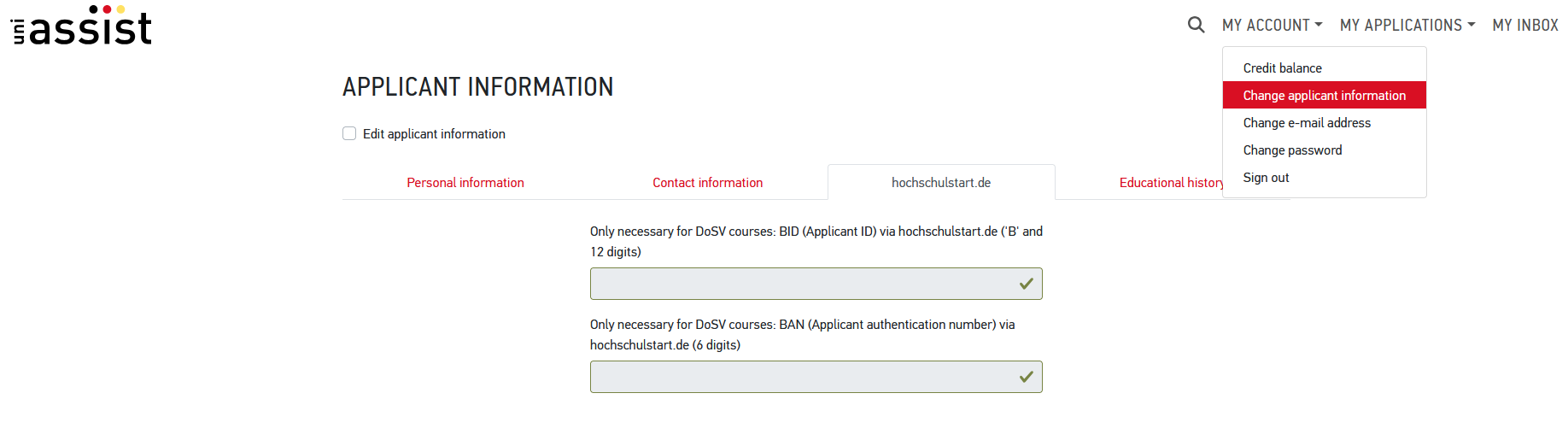
Screenshot 1. Hochschule Düsseldorf’s official example: My Account → Change applicant information → hochschulstart.de tab. BID and BAN are separate fields. Source, page 1.
About the illustrations. These are real screenshots from Hochschule Düsseldorf’s official guide, retrieved on 9 November 2026. Its examples show semester 2024/25: a historical interface, not the current intake. Labels and positions can change. Current uni-assist instructions take precedence; do not copy the example’s programme details.
My assist: find the programme and answer its questions
Select the correct semester and university in search. If nothing appears, remove unnecessary filters first: programmes appear when the university opens applications. Some VPD requests use alle Fächer — all subjects — instead of a specific programme; you then choose the programme in the university application.
Add the correct item to your selection list and open its details. Check degree, start semester, campus and study semester. A new entrant must not copy a screenshot’s second-semester option automatically.
Complete every additional programme question. Even programmes at one university can ask different questions. uni-assist: select a course.
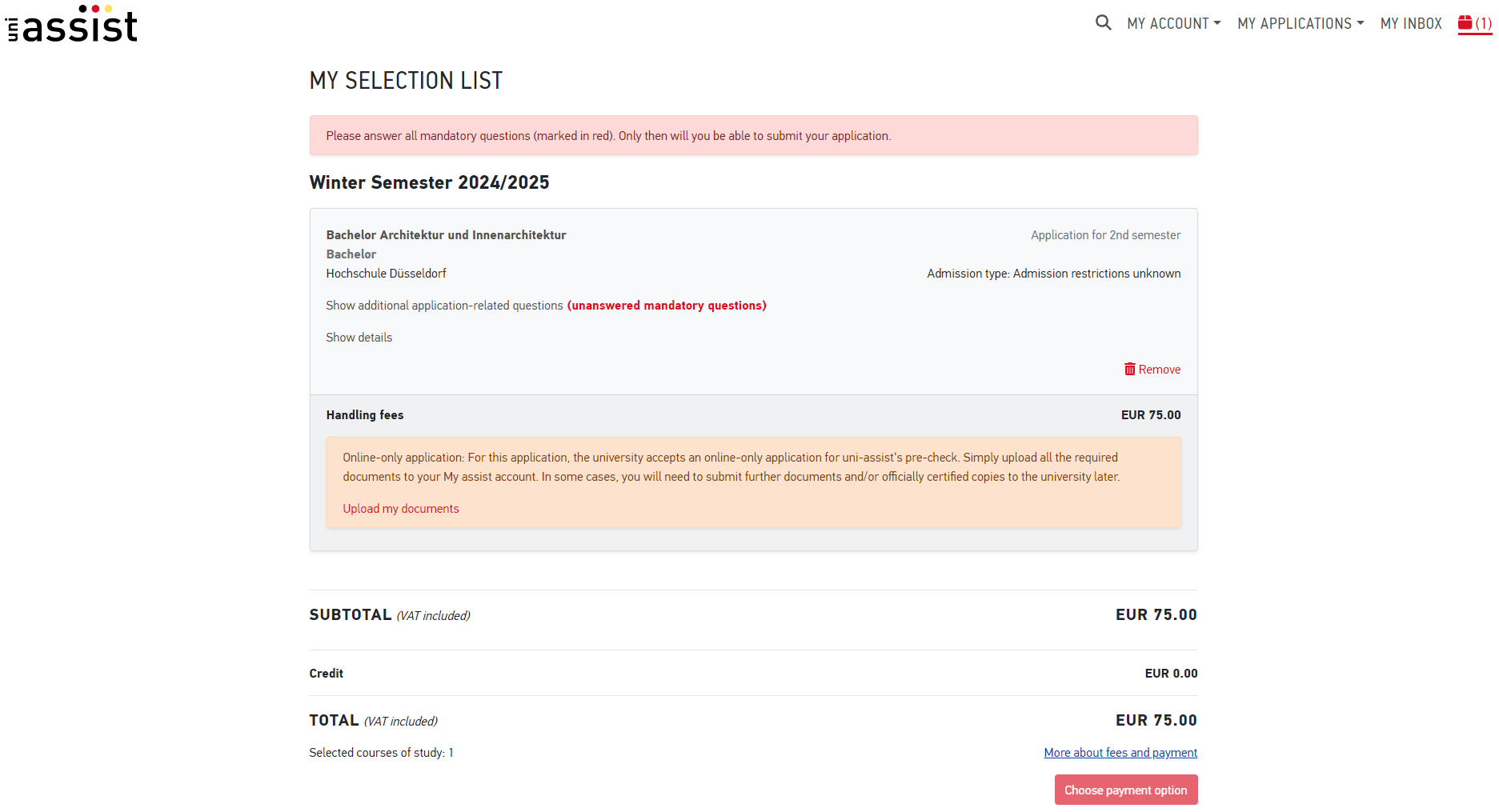
Screenshot 2. The red line indicates unanswered mandatory questions. Open the corresponding link on the card; Show details expands the explanation. This illustrates the interface, not a recommended programme or semester. Official guide, page 3.
My assist: upload documents
Open My documents and upload your PDF set. Older guides use My Applications → Documents; current uni-assist instructions call the section My documents.
uni-assist describes applications as fully digital. Uploaded documents must be official and legible. Upload common documents once and make programme-specific materials identifiable. Submit everything before its applicable deadline. Files being present in the account does not start evaluation: you must submit the application.
uni-assist: uploading documents.
Open every uploaded file to verify that it matches its name. Check separately whether the university later requires originals or certified copies for enrolment; digital uni-assist evaluation does not automatically remove that requirement.
My assist: pay and actually submit
At the verification date, uni-assist charges €75 for the first selected programme in a semester and €30 for each additional one, including VPD requests. The calculation restarts in a new semester. Three applications in one semester cost €75 + €30 + €30 = €135.
Review the selection list and proceed to checkout. Payment options include Visa/Mastercard and bank transfer. For bank-transfer credit, use only the details generated by your own account.
Adding credit does not submit an application. If you funded the balance, return to your selection list, complete checkout and use that credit to submit. Save the submission confirmation and receipt. uni-assist: Pay & submit.
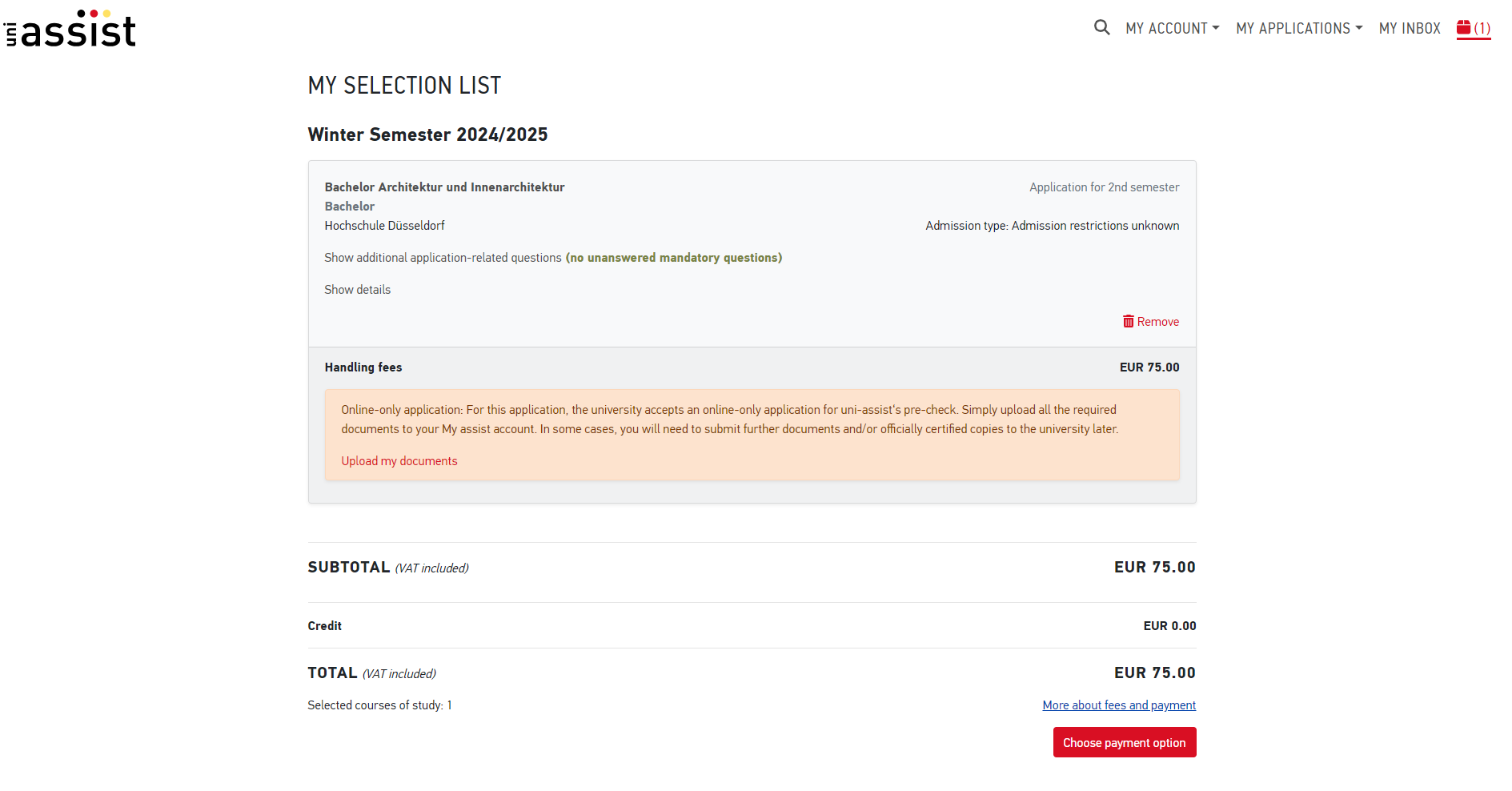
Screenshot 3. In this historical example the mandatory questions are complete and payment selection is available below. Current instructions use Proceed to checkout. No red error means you can continue; it does not confirm submission. Official guide, page 4.
If payment is rejected, check permitted methods and contact your bank or uni-assist support. Check the first payment’s status before paying again. Keep the application number and error text without passwords or full payment details.
VPD: the essential second stage
Select the university that requires the VPD when requesting it. After evaluation, download the PDF from My inbox. Processing normally takes 4–6 weeks; uni-assist recommends applying at least eight weeks before the deadline. A VPD is valid for one year from issue, although the university may need updated documents.
Now open the university’s official portal, create a separate application and attach the VPD with the other materials. Verify that the university application itself has been submitted. If your VPD is pending, temporary proof of requesting it and later delivery must be explicitly permitted by the university; this is not a universal rule.
Track two separate completion marks: “VPD received” and “University application submitted”. A single “uni-assist done” mark is insufficient.
Hochschulstart: registration, BID/BAN and priorities
Use this section if your programme and applicant category participate in DoSV according to the university. For medicine, dentistry, veterinary medicine and pharmacy, check your category especially carefully: international applicants do not always use the same central procedure as German applicants. Hochschulstart: international applicants.
Create an account and link the application
- Open the official DoSV portal.
- Register or use your existing account; do not create duplicates.
- Activate the account by email; the Hochschulstart link lasts 72 hours.
- Save your BID, applicant identifier, and BAN, application authentication number.
- Enter them in My assist or the university portal where required, then complete the application itself.
Hochschulstart registration and applications are free; this does not waive separate uni-assist fees. AntOn is also used for the central procedure for the four subjects above; the portal provides the link in the relevant offer. First check whether this procedure applies to you. Official registration instructions.
Rank programmes in your real order of preference
In Meine Bewerbungen, open Bewerbungen Priorisieren, arrange programmes by preference and press Speichern. Without your own order, application submission order is used. Priority does not improve your position in a university’s ranking; it determines which offer the system keeps. Lower-priority offers can drop out irreversibly when a higher one appears. Prioritisation rules.
Do not put a backup first just because admission looks easier. The order should reflect where you actually want to go if several offers are available.
Read the consequences before accepting. Manual acceptance ends participation of your other DoSV applications. Automatic coordination rules also apply: not clicking does not preserve every option indefinitely. Check the portal and current calendar. An offer being impossible at the moment during coordination is not a final rejection. Hochschulstart: coordination.
Applying directly to a university
Follow Apply / Bewerben on the official programme page and complete the university’s procedure. It may have its own portal, separate stages or different bachelor’s and master’s routes. Detailed instructions for that specific account belong in your personal brief.
Check four outcomes: the correct programme and applicant category; all required stages complete; submission confirmation received; the response portal and next deadline known. A direct application does not cancel any additional VPD or Hochschulstart stage.
Studienkolleg: a separate sequence
- Check whether you need Studienkolleg using qualification guidance and your target university’s rules.
- Choose the right subject track: the final FSP must qualify you for your intended field.
- Check recognition of the final certificate and eligible university types. Before paying a private provider, obtain this information in writing from the provider and target university.
- Check German-language and entrance-examination requirements. An English-taught bachelor’s does not automatically mean an English-taught Studienkolleg.
- Find the submission route: university, uni-assist or separate application. Preparatory-course deadlines may differ from bachelor’s deadlines.
- After admission, complete entrance-test, study and FSP requirements, then apply to the appropriate degree under its own rules.
Official starting point: uni-assist on Studienkolleg. An entrance-examination invitation is not a bachelor’s place. Clarify where you can apply afterwards and which final examination is recognised before choosing a course.
How much money to prepare
Amounts checked on 9 November 2026; confirm official prices before paying. There is no single tuition price for all of Germany.
- Item
- uni-assist / VPD
- Planning figure and check
- €75 first programme per semester + €30 each additional one; section 9
- Item
- Hochschulstart
- Planning figure and check
- Free registration and application; other fees are separate
- Item
- Tuition fee
- Planning figure and check
- Bachelor’s and many master’s courses at public universities often have no tuition; exceptions, private institutions and particular paid programmes exist
- Item
- Semester contribution
- Planning figure and check
- DAAD indicates about €70–430 per semester; check your university
- Item
- Living costs
- Planning figure and check
- DAAD indicates €900–1,200 per month; your city and housing may cost more
- Item
- Language examination
- Planning figure and check
- The selected centre’s price at booking
- Item
- Translations and additional checks
- Planning figure and check
- Your document set and the provider’s/official procedure’s charges
- Item
- National visa, if required
- Planning figure and check
- Usually €75 for adults; exceptions and service costs may apply
- Item
- Moving
- Planning figure and check
- Travel, temporary accommodation, rental deposit and initial expenses separately
Tuition, contributions and living costs: DAAD finances. An important exception: TUM tuition for students from outside the EU; check applicability and amount for your programme and start. Visa fee: German Federal Foreign Office.
Illustrative calculation, not a university quotation. Assume tuition €0, semester contribution €300, monthly living costs €1,100, three uni-assist applications in one semester and a €75 national visa. The basic first-year total is €13,200 + €600 + €135 + €75 = €14,010. Add actual examination, translation, verification, moving and deposit costs, plus a reserve. €300 and €1,100 are assumptions for this example.
Proof of funds: a separate availability check
For a study visa, the federal portal gives a €11,904 minimum for 2026 when using a blocked account; an eligible scholarship or declaration of commitment may also be possible. Conditions depend on the purpose of residence. Make it in Germany: study visa.
Blocked-account money funds your living costs. Do not add the full amount again to annual living costs already counted. Consider when you need the funds available, withdrawal limits and separate account fees. The visa minimum does not establish that it covers your chosen city’s costs.
Submitted: which responses to expect
Check the My assist application overview and messages. A usual evaluation estimate is 4–6 weeks; current workload can change it. After preliminary evaluation, the university decides admission. uni-assist: statuses and results.
- What you see
- In evaluation
- Meaning and next action
- Received for evaluation; monitor the account
- What you see
- Faulty
- Meaning and next action
- A requirement is not met; read the result and check whether correction before the deadline is possible
- What you see
- Okay
- Meaning and next action
- Preliminary evaluation passed; ordinary applications are forwarded, while VPD applicants must continue themselves
- What you see
- Case-by-case decision
- Meaning and next action
- The university will assess your case separately; no admission yet
- What you see
- Document request / test / interview
- Meaning and next action
- Complete the task by its deadline and verify confirmation
- What you see
- Conditional admission
- Meaning and next action
- Record every condition and deadline; follow the university’s letter
- What you see
- Zulassungsangebot / offer
- Meaning and next action
- Check acceptance rules and effects on other DoSV applications
- What you see
- Zulassungsbescheid / admission decision
- Meaning and next action
- Complete enrolment and payments within the specified time
- What you see
- Rejection
- Meaning and next action
- Read the reasons and next steps stated in the decision; reconsider other programmes
StudyRoute recommends a list of “response — action — deadline — confirmation”. “Documents received” is not “enrolled”. Conditions may concern language, graduation documents or other requirements; do not transfer one university’s conditions to another.
What happens after submission
- VPD received? If this is your route, submit the separate university application.
- Application submitted in the right place? Monitor messages: extra documents or selection → complete the task → continue waiting.
- Conditional offer? Meet the conditions and acceptance instructions in the letter. No academic conditions? Still complete enrolment formalities.
- DoSV? Check priorities and acceptance consequences before pressing the button.
- Rejection? Review the reason and further application options. A waiting-list position is not a final rejection.
- Place confirmed? Complete enrolment, funding, insurance and immigration requirements. Start housing and financial preparation in parallel beforehand.
After admission: enrolment, visa and housing
Enrolment — Immatrikulation / Einschreibung
Open the admission decision and record the enrolment deadline, acceptance method, payments and remaining documents. Provide suitable health-insurance evidence where required. Admission is not completed student registration. DAAD: student health insurance.
Visa and residence
Check visa requirements for your citizenship and status. Start with Make it in Germany and your competent consulate’s instructions. Online submission uses the Consular Services Portal / Auslandsportal where the service is available for your case.
Select the correct purpose, gather that procedure’s document list, complete online stages and attend the in-person appointment when scheduled. Degree study, preparatory study and searching for a study place have different conditions; do not use one checklist for all three. If an online service is unavailable, follow your competent mission’s instructions. Foreign Office: application procedure.
VFS Global, TLScontact or the consulate? The channel depends on residence and application category; VFS is not a universal student route. Open the StudyRoute visa navigator, select citizenship and country of residence, and check your mission’s official instructions. Some routes use TLScontact; online submission and an in-person appointment can be separate stages. If the channel remains unconfirmed, check with the competent mission before booking or paying.
After entry, complete applicable address registration and residence-permit requirements within the time limits for your case. University admission does not replace permission to enter and reside.
Housing
Start early with the university’s Accommodation section and local Studierendenwerk/Studentenwerk. Check when residence applications open and which documents they need. An accommodation application does not mean a room has been allocated. Deutsches Studierendenwerk: accommodation.
Plan temporary accommodation if needed, a deposit and a move-in date. Compare the study city, campus address and journey time. Check the contract and payment terms before sending money.
Frequently asked questions
Does everyone apply through uni-assist? No. The university sets the route for the programme and applicant category; see section 3.
Does a VPD mean I have applied to the university? No. This route requires a separate university application after obtaining the document.
I uploaded PDFs and added credit. Is my application submitted? Not necessarily. Complete submission of the selected application and find its confirmation; sections 8–9 explain the difference.
Must I post paper documents to uni-assist? Current uni-assist instructions describe digital application. Check the university’s later enrolment requirements separately.
Can an English-taught bachelor’s follow a German-taught Studienkolleg? Yes. The preparatory language is not determined solely by the degree language. Check the track and course conditions.
Is there one IELTS or German score for all of Germany? No. Use each programme’s accepted certificates and scores.
Can I treat German higher education as free? Only after checking tuition for your programme and category. Semester contributions and living costs remain even with €0 tuition.
Does everyone need Hochschulstart and BID/BAN? No. They apply to the procedure specified by the university. Set DoSV priorities deliberately.
When can I stop checking portals? After completing every university-required stage, not after the first receipt or positive preliminary evaluation.
Your next step
Choose programmes and record one application-route row for each, as in section 2. Check eligibility, language and budget, then use the appropriate portals.
A personal StudyRoute brief adds specific universities, documents and deadlines for your educational profile. Ordering a brief is an available next step; this guide and official links remain available for independent applications.
Editorial transparency. StudyRoute explains the procedure in its own words and is not uni-assist, Hochschulstart or a university. The university makes admission decisions. All amounts have a verification date; use your programme’s current official instructions when requirements change.